Secure Business Guide may earn a commission if you buy through links on this page, at no extra cost to you.
Our recommendations are based on practical use cases, security needs, features, pricing, and suitability for small businesses.
WordPress websites do not always display an obvious “you have been hacked” message. Many compromises are designed to remain unnoticed while attackers redirect visitors, send spam, create hidden accounts, inject links, steal data or retain access for later use.
Knowing the warning signs can help a small business identify a problem before it causes prolonged SEO damage, customer distrust or operational disruption.
This guide covers 15 signs that a WordPress website may be compromised, how to check them and what to do if you find suspicious activity.
15 Warning Signs a WordPress Website May Be Hacked
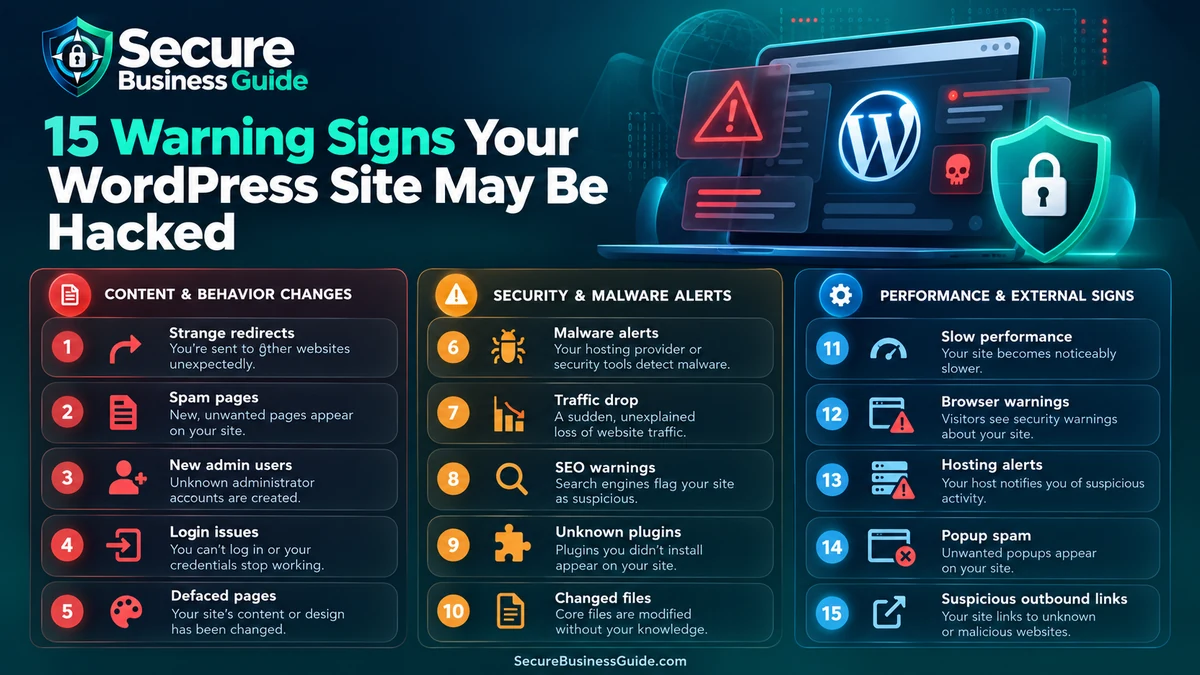
1. Google or Bing Warns That the Website Is Unsafe
Search-engine warnings are among the clearest indicators of compromise. A site may be flagged for malware, deceptive pages or harmful downloads.
The official WordPress hacked-site guidance specifically identifies search-engine blacklisting as an indicator of compromise.
See the official WordPress hacked-site guidance.
2. Your Hosting Provider Suspends or Disables the Site
Hosting companies may suspend a compromised account when malicious files, spam, phishing pages or attacks against other systems are detected.
Do not simply restore the site from an old copy without investigating the cause. Otherwise the vulnerability that enabled the compromise may remain.
3. Antivirus Software Warns Visitors About Your Domain
If customers report that endpoint security software blocks your website, investigate immediately.
Multiple independent reports are particularly important because they can indicate malicious scripts or downloads being served to visitors.
4. Unknown WordPress Administrator Accounts Appear
An unfamiliar administrator is a major red flag.
Review WordPress users regularly and investigate accounts you cannot associate with a legitimate employee, contractor, agency or service.
5. Visitors Are Redirected to Unrelated Websites
Malware may redirect only selected visitors, devices, referrers or search-engine traffic, making the behavior difficult for the site owner to reproduce.
Test from different browsers and devices if customers report suspicious redirects.
6. Spam Pages Appear in Google Search Results
A hacked WordPress site may contain injected pages targeting gambling, pharmaceuticals, counterfeit products or unrelated keywords.
Search Google for:
site:yourdomain.comReview unfamiliar indexed URLs rather than focusing only on the normal navigation.
7. Your Rankings or Organic Traffic Collapse Suddenly
A sudden SEO decline can have many causes, so it does not prove compromise by itself.
However, a major traffic drop combined with redirects, spam URLs, malware warnings or unauthorized site changes deserves immediate investigation.
For ongoing SEO diagnostics and competitive visibility, CBOOMARANK can help website owners evaluate search performance, authority, competitors and backlink signals.
8. WordPress Files Change Without Explanation
Unexpected changes to PHP, JavaScript, WordPress core files or plugin files can indicate unauthorized modification.
Compare WordPress core against known-good checksums where practical:
wp core verify-checksumsA failed checksum is not automatically proof of malware, but unexplained differences deserve investigation.
9. Unknown Plugins or Themes Appear
Attackers sometimes install malicious plugins or disguise persistence as an ordinary extension.
Review every installed plugin and theme. Ask whether you know who installed it, why it exists and where it came from.
For legitimate security tooling, review our WordPress security plugin guide.
10. Your Site Sends Spam Email
Compromised WordPress installations can be abused for spam or phishing.
Warning signs include hosting complaints, high outbound mail volume, customer reports and domain reputation problems.
11. WordPress Becomes Unusually Slow
Performance problems alone do not prove a hack. Database issues, traffic spikes and poorly optimized plugins can also cause slowdowns.
But unexpected CPU usage, unexplained processes or severe slowdown combined with other indicators may point to malicious activity.
12. Contact Forms or Checkout Behavior Changes
Attackers may alter forms, payment-related scripts or JavaScript loaded on important pages.
Businesses should periodically test contact forms, lead forms and checkout flows from a normal visitor perspective.
13. Security Settings Change Without Authorization
Investigate unexplained changes to firewall rules, security plugins, administrator roles, two-factor authentication, update settings or login controls.
14. Strange Scheduled Tasks or Cron Jobs Appear
Persistence can sometimes involve scheduled execution.
WP-CLI users can inspect WordPress cron events:
wp cron event listDo not delete unfamiliar jobs blindly on a production website. Establish what created them first.
15. You Receive Reports That Your Site Is Attacking Other Websites
The official WordPress documentation lists reports that a site is being used to attack other systems as an indicator of compromise.
Treat such reports as urgent even if the website appears normal in your own browser.
What to Do If You Think Your WordPress Site Is Hacked
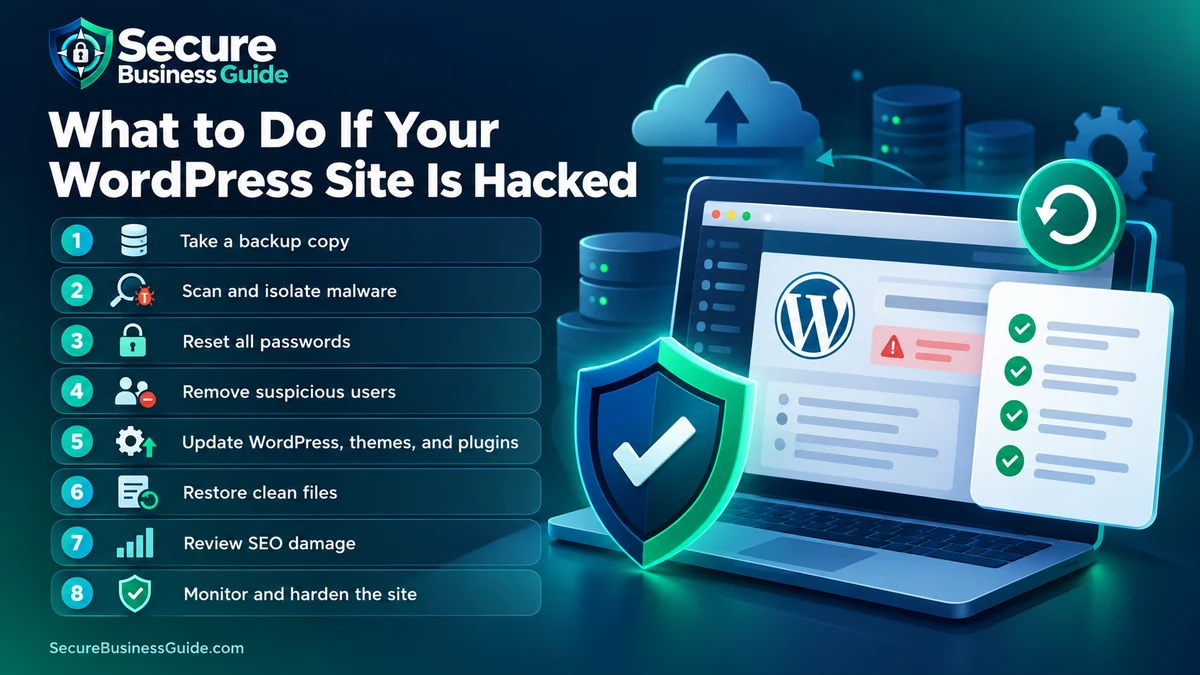
1. Preserve Evidence Before Making Major Changes
If possible, save relevant logs, record timestamps and take a backup or snapshot of the compromised environment before extensive cleanup.
This can help establish how the compromise occurred.
2. Create a Clean Recovery Plan
Determine whether you have a known-good backup from before the compromise.
See our best cloud backup tools for business files for improving future recovery resilience.
3. Reset Privileged Credentials
Change WordPress administrator credentials and review hosting, SFTP/SSH, database, control-panel and API credentials that may have been exposed.
Use unique passwords rather than variations of one shared password. See our password manager recommendations.
4. Update WordPress, Plugins and Themes
Once evidence is preserved and recovery is planned, patch known vulnerable software.
Remove unsupported extensions that are no longer needed.
5. Scan the Website
Check WordPress core integrity, plugin directories, theme files, uploads, database content and server logs.
Using more than one detection method can reduce the chance of missing persistence.
6. Remove Unauthorized Users and Persistence
Delete only accounts you have confirmed are unauthorized. Look for unexpected plugins, modified files, cron jobs and other persistence mechanisms.
7. Get Professional Help When Necessary
A production compromise can involve more than deleting one infected file.
If you are uncertain whether the site is clean, see our comparison of WordPress malware removal services.
How to Prevent Another WordPress Compromise
- Keep WordPress core current.
- Patch plugins and themes promptly.
- Remove unused software.
- Use strong unique passwords.
- Enable MFA for privileged accounts.
- Limit administrator access.
- Maintain tested backups.
- Protect hosting and DNS accounts.
- Monitor uptime and unexpected file changes.
- Review logs and administrator accounts.
- Use HTTPS everywhere.
- Maintain a response plan.
For a broader baseline, work through our website security checklist for small business owners.
Can a Secure Hosting Provider Help?
Hosting cannot eliminate application vulnerabilities, but security-conscious hosting can provide useful controls such as backups, isolation, malware detection, logging, firewall services and recovery support.
See our guide to secure web hosting for small businesses.
Can Antivirus Software Protect a WordPress Website?
Endpoint antivirus protects computers and users rather than replacing server-side WordPress security. It can still help prevent compromised administrator devices from becoming another route into business systems.
See our small-business antivirus guide.
Monitor Search Performance After a Security Incident
A compromised site can affect rankings, indexed URLs, backlinks and visitor trust even after the malware itself has been removed.
Monitor indexing, organic traffic, important landing pages and backlink changes during recovery.
Explore CBOOMARANK for website analysis, keyword research, competitor insights and backlink intelligence.
You can also view CBOOMARANK plans and pricing.
Frequently Asked Questions
How can I tell if my WordPress website is hacked?
Look for multiple indicators: malware warnings, redirects, unknown users, unexpected files, spam pages, unauthorized settings, suspicious plugins or abnormal server activity.
Does a sudden ranking drop mean my website was hacked?
No. Rankings can fall for many reasons. Treat it as a stronger security signal when combined with malware warnings, injected URLs, redirects or unauthorized changes.
Can I clean a hacked WordPress website myself?
Simple incidents may be manageable for experienced administrators, but persistent or business-critical compromises often justify professional incident response and malware removal.
Should I restore a backup?
A known-good backup can be valuable, but restoration alone is not enough unless the vulnerability or stolen credential that caused the incident is also addressed.
Final Takeaway
A WordPress compromise may reveal itself through search-engine warnings, unauthorized administrators, redirects, spam URLs, changed files, suspicious plugins, email abuse or abnormal site behavior.
The strongest response is systematic: preserve evidence, investigate, patch, remove persistence, rotate credentials, restore safely where appropriate and strengthen monitoring so the next warning sign is detected earlier.
Related Security Guides