
A small business incident response plan is the written playbook your team follows when a cyber incident threatens accounts, devices, websites, cloud services, customer information or business operations. The goal is not to predict every attack. It is to make sure people know what to do, who makes decisions, what evidence must be preserved, how systems are contained, when customers or regulators may need to be notified, and how the business returns to normal without creating a second incident.
That preparation matters because the first minutes of an incident are usually confusing. A finance employee may report a suspicious transfer, an administrator may notice an unfamiliar login, a website may suddenly redirect visitors, or staff may lose access to shared files. If nobody knows who owns the response, valuable evidence can be deleted, compromised accounts can remain active and recovery can take longer than necessary.
This guide provides a practical 2026 incident-response framework for small businesses. It is designed for organizations that may not have a full security operations center but still need a disciplined way to detect, contain, investigate and recover from cyber incidents.
What Is a Small Business Incident Response Plan?
An incident response plan is a documented process for managing cybersecurity events that could affect confidentiality, integrity, availability, finances, legal obligations or reputation. It defines roles, escalation rules, communication channels and technical actions before an emergency occurs.
An incident can be obvious, such as ransomware encrypting shared files, but many incidents are quieter. Examples include a compromised Microsoft 365 account, stolen session cookies, malicious mailbox forwarding rules, unauthorized WordPress administrators, payment diversion, leaked customer information, malware on an employee laptop, exposed API keys or suspicious changes to DNS records.
The plan should therefore cover more than malware removal. It should connect cybersecurity with business continuity, legal review, communications, customer support, finance and recovery.
Why a Small Business Incident Response Plan Matters in 2026
Modern attacks increasingly target identity, cloud services and business processes rather than a single computer. A stolen password, session token or OAuth grant can give an attacker access without installing obvious malware. Business email compromise can manipulate legitimate payment workflows. Website attacks can quietly inject redirects or administrator accounts. Ransomware operations may combine data theft, credential abuse and encryption.
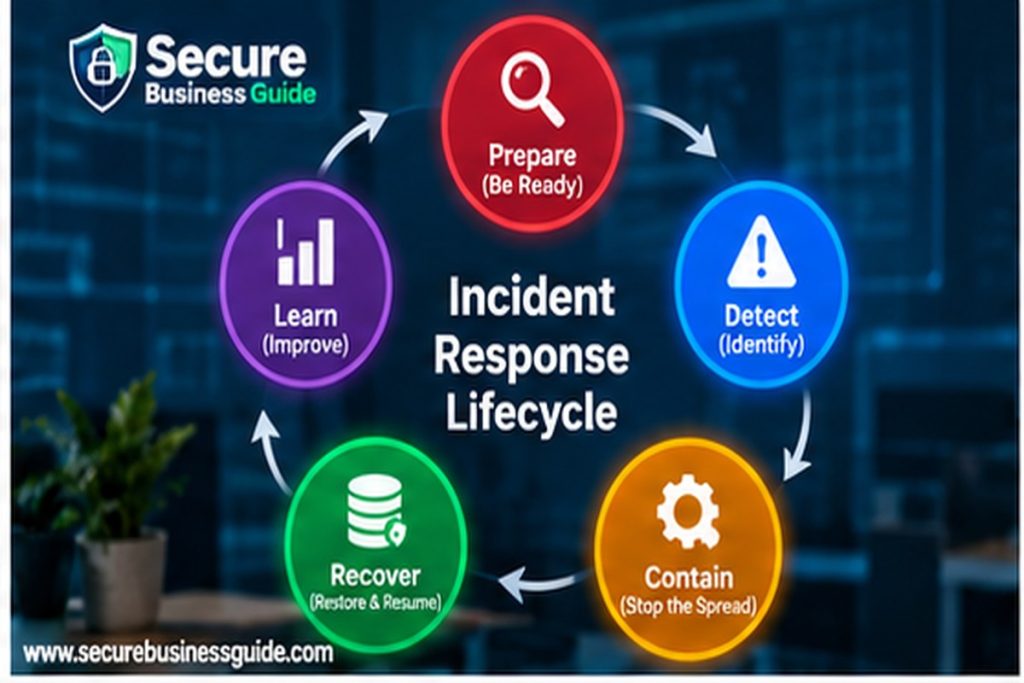
The U.S. National Institute of Standards and Technology updated its incident-response guidance through NIST SP 800-61 Revision 3. The revision aligns incident response with the NIST Cybersecurity Framework 2.0 and treats response as part of broader cybersecurity risk management rather than an isolated emergency activity.
The Federal Trade Commission also advises small businesses to develop incident-response, disaster-recovery and business-continuity plans and to test them regularly. Its guidance emphasizes limiting damage, investigating what happened, maintaining business operations and notifying affected parties when required.
7 Core Parts of a Small Business Incident Response Plan
Small Business Incident Response Plan: Define the Response Team
Start by deciding who has authority during a cybersecurity incident. The team does not need to be large, but each responsibility should have an owner and backup contact.
| Role | Primary responsibility |
|---|---|
| Incident coordinator | Owns the response, assigns actions, keeps the timeline and escalates decisions. |
| Technical lead | Investigates systems, accounts, logs, endpoints, websites and cloud services. |
| Business owner / leadership | Approves major operational, financial and communication decisions. |
| Legal / privacy adviser | Assesses contractual, regulatory and breach-notification requirements. |
| Communications contact | Coordinates staff, customer, supplier and public messaging. |
| Finance contact | Handles payment fraud, bank communications and financial controls. |
| External providers | Hosting, managed IT, security, cyber insurance, legal counsel and other specialists. |
Store this contact list somewhere accessible even if your normal email or cloud platform is unavailable. If the plan exists only inside a compromised Microsoft 365 tenant, the team may not be able to access it when needed.
2. Create an Asset and Account Inventory
You cannot respond efficiently if you do not know which systems matter. Maintain a simple inventory of business email, WordPress sites, hosting control panels, domain registrars, DNS accounts, payment processors, banking portals, CRM systems, cloud storage, employee devices, administrator accounts and critical API integrations.
For website-specific controls, use the Website Security Checklist for Small Business Owners as a supporting baseline.
3. Define Severity Levels Before an Incident
Not every alert requires the same response. A failed login attempt is different from a confirmed administrator account takeover. Define simple severity levels so employees know when to escalate.
| Severity | Example | Response expectation |
|---|---|---|
| Low | Blocked phishing message or unsuccessful login attempts. | Document, monitor and apply routine controls. |
| Moderate | Suspicious sign-in, malware detected and contained, lost managed device. | Investigate promptly and verify containment. |
| High | Confirmed account compromise, website compromise, unauthorized payment attempt. | Activate incident team and begin containment immediately. |
| Critical | Ransomware, major data exposure, successful payment fraud, widespread cloud compromise. | Executive escalation, external specialists, legal review and business-continuity actions. |
Small Business Incident Response Plan: Preserve Evidence
Evidence helps determine what happened, how the attacker entered, what they accessed and whether they remain inside the environment. Before deleting files or resetting systems, preserve useful information where practical.
Useful evidence may include authentication logs, email headers, mailbox rules, endpoint alerts, firewall records, WordPress logs, hosting logs, screenshots, suspicious files, payment instructions, timestamps, IP addresses, admin-account changes and copies of malicious messages.
Small Business Incident Response Plan: Backup and Recovery
Backups are part of incident response only if they can actually restore operations. Identify which systems are backed up, how often, where copies are stored, who can access them and when restoration was last tested.
Do not assume a backup is clean simply because it exists. If attackers were present for days or weeks, recent backups may contain malicious changes or compromised credentials. Recovery should therefore include validation, patching and credential resets where appropriate.
For ransomware preparation, see the Small Business Ransomware Protection Checklist for 2026.
6. Prepare Communications and Notification Paths
A technical response can fail if communication is chaotic. Decide in advance who communicates with employees, customers, suppliers, banks, insurers, cloud providers, hosting companies and regulators where appropriate.
Legal notification duties vary by country, state, industry and the type of information involved. Do not rely on a generic internet checklist to decide whether a breach notification is legally required. Consult appropriate legal or privacy professionals when personal, regulated or contractually protected information may have been exposed.
Small Business Incident Response Plan: Build Incident Playbooks
A general plan is useful, but small teams respond faster when they also have one-page playbooks for common scenarios. The most useful starting playbooks are ransomware, business email compromise, cloud-account compromise, website compromise and lost or stolen devices.
Small Business Incident Response Plan: Step-by-Step Process
Step 1: Detect and Validate the Incident
The first task is to determine whether the report is a real security incident, a benign event or an unresolved alert requiring more investigation. Record the time the issue was discovered, who reported it, which systems may be affected and what symptoms were observed.
Ask focused questions: What changed? When did it begin? Which account, device or system is involved? Is the suspicious activity still happening? Has money, data or access already been lost? Are other employees seeing the same problem?
Step 2: Contain the Threat Without Destroying Evidence
Containment is about stopping additional damage while preserving enough information to understand the incident. Possible steps include disabling a compromised account, revoking active sessions, isolating an infected endpoint, blocking a malicious IP or domain, disabling an exposed API key, putting a compromised website into maintenance mode or suspending a risky integration.
Step 3: Preserve Evidence and Build a Timeline
Start a simple incident log. Every important action should include a timestamp, the person responsible and the result. A timeline makes post-incident review easier and can help legal, insurance and forensic teams understand what happened.
Step 4: Eradicate the Root Cause
Do not stop at the visible symptom. If a malicious WordPress administrator is deleted but the vulnerable plugin that allowed access remains installed, the attacker may return. If a mailbox password is reset but an attacker-controlled MFA method remains registered, the account may still be compromised.
Root-cause remediation can include patching vulnerable software, removing persistence, deleting unauthorized accounts, resetting passwords and recovery methods, revoking sessions and tokens, removing suspicious mailbox rules, rotating exposed API keys, correcting DNS changes and rebuilding systems from known-good images where necessary.
Step 5: Recover Carefully
Recovery is not simply switching everything back on. Restore services in a controlled order, verify that systems are clean and monitor closely for recurrence.
Prioritize systems according to business impact. For many small businesses, email, payment processing, websites, customer data and shared files will be among the highest priorities.
Step 6: Communicate and Meet Notification Requirements
If customers, employees, suppliers or partners are affected, communication should be accurate, timely and coordinated. Avoid speculation. State what is known, what is still being investigated and what recipients should do.
The FTC's Data Breach Response: A Guide for Business recommends having a communications plan and clearly describing what is known about the compromise, what information was involved, what remediation has been taken and what affected people can do to protect themselves.
Step 7: Conduct a Post-Incident Review
After operations stabilize, review the incident while details are still fresh. The goal is not to blame employees. It is to reduce the chance of recurrence and improve future response.
Ask how the incident began, what allowed the attacker to succeed, which controls worked, which failed, whether detection was fast enough, whether logs were available and whether backups and communications worked as planned.
Small Business Incident Response Plan: The First 60 Minutes
- Confirm the incident coordinator. One person should own the response and decision log.
- Record what was observed. Capture screenshots, timestamps, affected accounts and initial reports.
- Identify affected systems. Determine whether the issue involves email, endpoints, websites, payments, cloud accounts or data.
- Contain obvious ongoing access. Revoke sessions, isolate devices or disable compromised accounts when appropriate.
- Preserve evidence. Do not casually delete logs, emails or files that may be needed later.
- Protect privileged accounts. Review administrators, recovery methods and authentication changes.
- Check for financial exposure. If payments are involved, contact the bank or payment provider immediately.
- Call external specialists when needed. Serious incidents may require forensic, legal, insurance or hosting support.
- Use a trusted communication channel. If email is compromised, coordinate through another verified channel.
- Start the incident timeline. Record every important action and decision.
Incident Playbook 1: Ransomware
If ransomware is suspected, isolate affected devices and network segments, protect backups and avoid allowing infected systems to continue communicating. Determine whether data theft occurred in addition to encryption. Do not rush into wiping systems before understanding the scope of compromise.

Incident Playbook 2: Business Email Compromise and Payment Fraud
If an employee reports a fraudulent invoice, supplier bank change or suspicious executive request, contact the financial institution immediately if money has been sent. Preserve the fraudulent emails and headers, reset compromised credentials, revoke sessions, review mailbox forwarding rules and verify recent payment changes using trusted contact information.
See our full guide to Business Email Compromise in 2026.
Incident Playbook 3: Microsoft 365 or Cloud Account Compromise
For a suspected Microsoft 365 compromise, review sign-in activity, revoke sessions, reset credentials and authentication methods, inspect inbox and forwarding rules, check OAuth application grants, verify administrator roles and look for suspicious changes to security settings.
Our Microsoft 365 Security Checklist and Passkeys vs Passwords guide provide additional controls.
Incident Playbook 4: WordPress or Website Compromise
Website compromise may involve malicious redirects, injected JavaScript, spam pages, new administrator accounts, changed plugins, modified themes, altered database records or DNS manipulation.
Preserve a copy of the affected site where practical, review administrators and recent changes, scan files and databases, identify the vulnerable component, rotate credentials, patch or remove the root cause and verify the site before returning it to normal service.
Incident Playbook 5: Lost or Stolen Business Device
A lost laptop or phone becomes a security incident when it can access business email, cloud files, password managers, VPNs, customer records or administrative tools. Confirm whether the device is encrypted and managed, revoke sessions where appropriate and review sign-in activity for unauthorized use.
How to Test a Small Business Incident Response Plan
A small business incident response plan should be tested before a real emergency so employees know their roles, escalation paths and recovery priorities.
A plan that has never been tested may fail during a real emergency. Small businesses can perform a simple tabletop exercise without expensive tools.
A finance employee reports that a supplier's bank account was changed by email yesterday. A payment has already been sent, and the employee now notices an unfamiliar login in Microsoft 365.
Ask the team who is called first, who contacts the bank, who secures the mailbox, who preserves the email evidence, who contacts the supplier, who checks other accounts, and what happens if normal email cannot be trusted. Document gaps and update the plan.
Small Business Incident Response Plan Mistakes to Avoid
Deleting Evidence Too Quickly
Cleaning a system before preserving useful evidence can make it harder to understand how the incident happened and whether the attacker still has access.
Resetting Only One Password
A compromised identity may involve active sessions, recovery methods, MFA registrations, tokens, forwarding rules or connected applications. Review the full identity, not only the password.
Using the Compromised Communication Channel
If email is under attacker control, do not coordinate sensitive incident decisions entirely through that email system.
Restoring Before Fixing the Root Cause
Restoring a clean backup without patching the vulnerability that caused the incident can lead to immediate reinfection.
Failing to Contact Financial Institutions Quickly
For payment fraud, delays can reduce the chance of recovering funds. Escalate financial incidents immediately.
Small Business Incident Response Plan Template
Your written plan can be concise. At minimum, include purpose and scope, incident contacts, critical systems, severity levels, initial actions, scenario playbooks, external contacts, communication responsibilities, recovery priorities and a review schedule.
How a Small Business Incident Response Plan Supports Cybersecurity Risk Management
NIST SP 800-61 Rev. 3 emphasizes that incident response is connected to broader cybersecurity risk management. That means prevention, detection, response and recovery should reinforce one another.
Security also protects the digital assets that support marketing and revenue. Once the security foundation is stable, business owners and website teams can use CBOOMARANK to analyze SEO performance, research competitors, monitor authority and identify growth opportunities. For available plans, see CBOOMARANK pricing.
Frequently Asked Questions
Does a very small business really need an incident response plan?
Yes. A small team may have fewer systems, but it often has fewer specialists available during an emergency. A short, practical plan helps employees make faster decisions and know when outside help is required.
What is the difference between incident response and disaster recovery?
Incident response focuses on identifying, containing, investigating and resolving security incidents. Disaster recovery focuses on restoring systems and data after a disruptive event.
How often should the plan be tested?
Test it periodically and whenever major systems, vendors, employees or business processes change. A tabletop exercise can expose gaps without disrupting production systems.
When should a business contact law enforcement?
This depends on the incident, location, industry and impact. Serious fraud, ransomware, data theft and other criminal activity may justify law-enforcement involvement.
Final Takeaway
A strong small business incident response plan turns an emergency from an improvised scramble into a controlled process. Define the team, inventory critical systems, establish severity levels, preserve evidence, prepare recovery procedures and create short playbooks for the incidents most likely to affect your organization.
Then test the plan. The best time to discover that a phone number is outdated, a backup cannot be restored or nobody knows who should call the bank is during a tabletop exercise—not during an active breach.